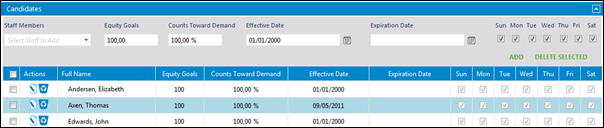
Candidates must be setup for the build to auto-assign staff in the roles.
Go to Setup > Role setup > Role list
Click on the role needing candidate update.
Click on Candidates to expand the options.
Click on the drop down under Staff Members and choose staff.
Set equity goals as needed.
Choose Expiration Date only if the staff will be a candidate for a set time frame.
Choose the days of the week that is needed.
Click on Add.