
Go to Setup > Role setup > Role list
Click on Add New Time Off Role in upper right corner.
Enter role name.
Enter role abbreviation.
Choose allowance counts as: either Days or Hours.
Add default site if needed.
Choose from the options listed on page 7.
Click on Apply before proceeding.
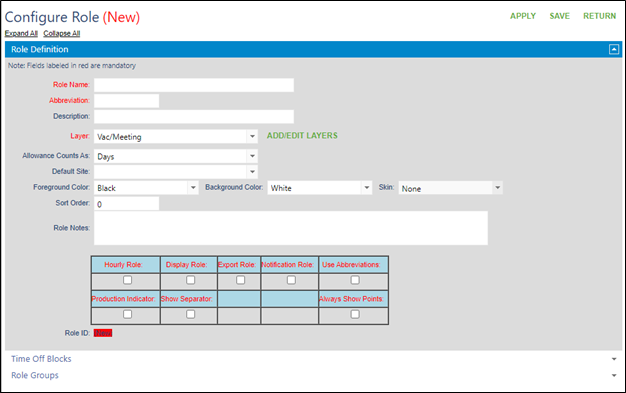
Click on Time Off Block to expand options.
Click on the drop down next to Add.
Choose all time off blocks required for the time off role.
Click on Add.
Click on Role Groups to expand options.
Click on the drop down next to Add.
Choose all role groups required for the time off role.
Click on Add.
Go to the top and click on Save.
Click on Add New Time Off Role in upper right corner.
Enter role name.
Enter role abbreviation.
Choose allowance counts as: either Days or Hours.
Add default site if needed.
Choose from the options listed on page 7.
Click on Apply before proceeding.
Click on Time Off Block to expand options.
Click on the drop down next to Add.
Choose all time off blocks required for the time off role.
Click on Add.
Click on Role Groups to expand options.
Click on the drop down next to Add.
Choose all role groups required for the time off role.
Click on Add.
Go to the top and click on Save.