
Go to Scheduling > Edit Schedule > Date View (or Month View)
Right click on assignment then click on Delete Assignment.
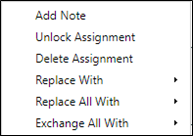
To remove a staff member from an assignment and show as unfilled on the schedule replace the staff member with None.
Go to Scheduling > Edit Schedule > Date View (or Month View)
Right click on assignment > Replace With> Today Only> None