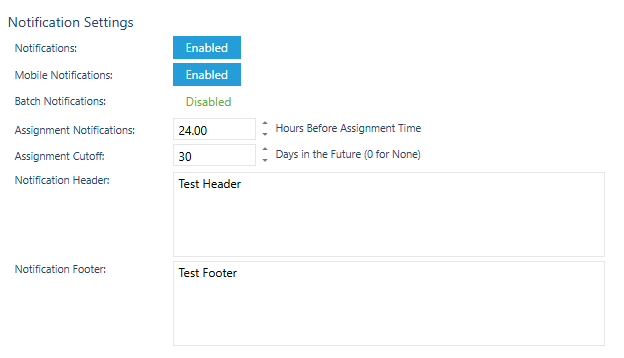
Notifications can be setup to send via email, Momentum internal messages or mobile app.
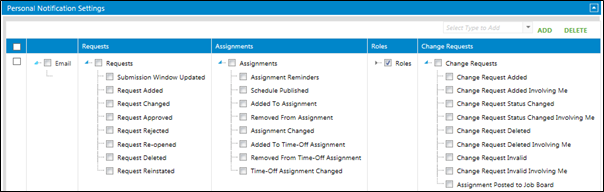
There are four main types of notifications:
Requests – options for added, approved, rejected requests
Assignments – options for added, changed, deleted assignments
Roles – options for specific role changes
Change Request – options for approved or denied change requests
Setting up Personal Notifications
Click on the Personal Notification Settings tab below the personal information form by clicking on title bar.
Click on the drop down next to Add and choose the type of notification required.
Click on the blue arrows to expand the options for each type of notification.
Click on Save at the top of the page.
Setting up Administrative Notifications
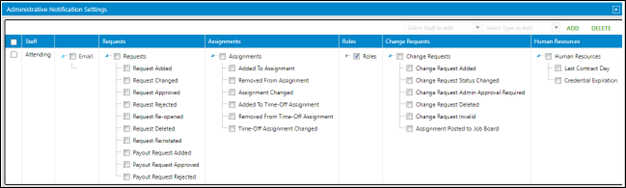
Click on the Administrative Notification Settings tab below the personal information form by clicking on title bar.
Click on the drop down next to Add and choose the staff or staff group required.
Click on the drop down next to Add and choose the type of notification required.
Click on the blue arrows to expand the options for each type of notification.
Click on Save at the top of the page.
Enabling Notifications on Site
Click on Setup > Business Setup.
Click on Notifications in the left navigation.
Notifications: will turn on notifications on the site.
Mobile Notifications: will turn on mobile app notifications.
Batch Notifications: will allow a time to be chosen when all notifications are sent in one email rather than as the updates are made throughout the day.