
Assignments behave largely the same but with some new information added.
Left click opens the assignment for editing, opening a popup in the center of the screen.
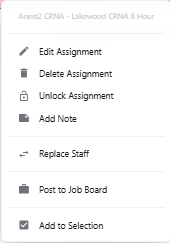
Right click opens a dropdown menu with options including edit, delete, lock/unlock, add note, replace staff, post to job board, and add to selection.
Assignments can be dragged and dropped onto one another to swap, or onto a date to change the date of the assignment (equivalent of editing the dates of an assignment).
Drag and drop assignment over a date to change the date on the assignment while keeping the staff member the same.
Right click to drag one assignment over another to swap assignments between staff members. It can be used to swap assignments between staff members on the same day or different days or swap assignments for the same staff member on different days.
When viewing all items (published + unpublished) only unpublished items may be active for drag and drop.