
In the new version of momentum, users have the ability to multiselect assignments.
When showing “All Items Selected”, only unpublished items may be added to multiselect.
If only published/unpublished assignments are being shown, then anything may be added.
Items that are not multi-selectable are greyed out and users cannot take actions on those items.
To add to multiselect:
Right click an assignment and choose Add to Selection.
Once the assignment has been added, ‘multiselect mode’ is active.
Additional assignments can be added at this point using left mouse click.
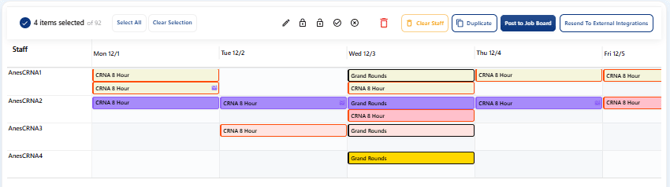
Multiselected work assignments can be:
bulk edited
deleted
locked / unlocked
posted / removed from job board
staff cleared (empty the assignment of staff)
publish/unpublish
Non-work assignments follow the same rules as above for multiselect (ie cannot multiselect non-work assignments that are published when viewing all items). Non-work assignments can be deleted only.
To exist multiselect mode, clear the selection OR unclick every multiselected assignment.